
Artwork Tracker Lite3.3 - App Store
You'll be able to see results in few seconds.
Publisher Description
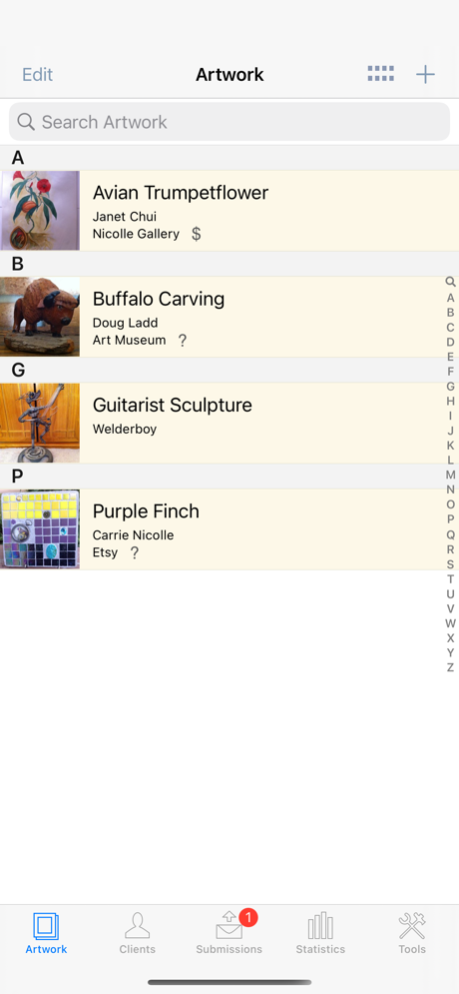
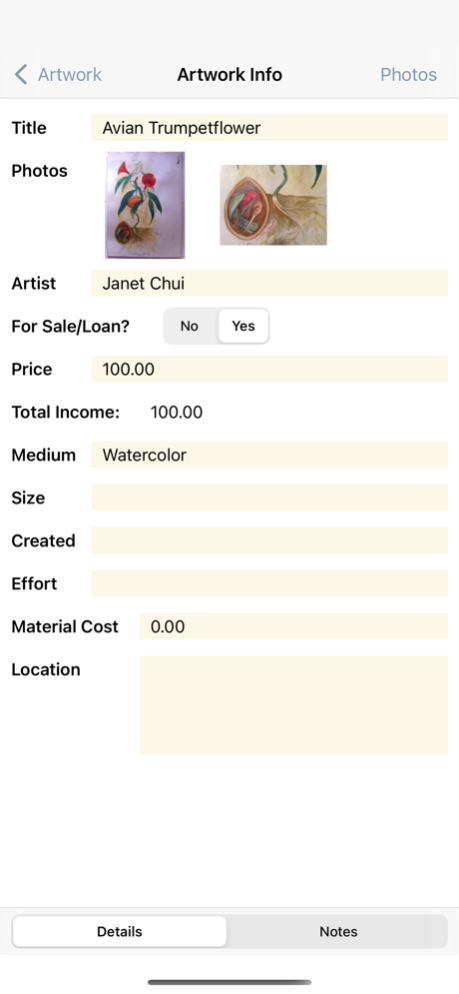
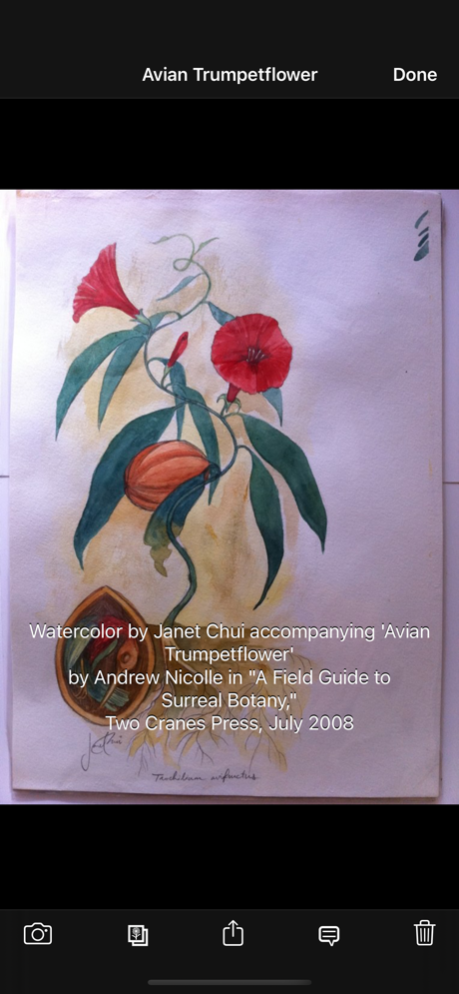
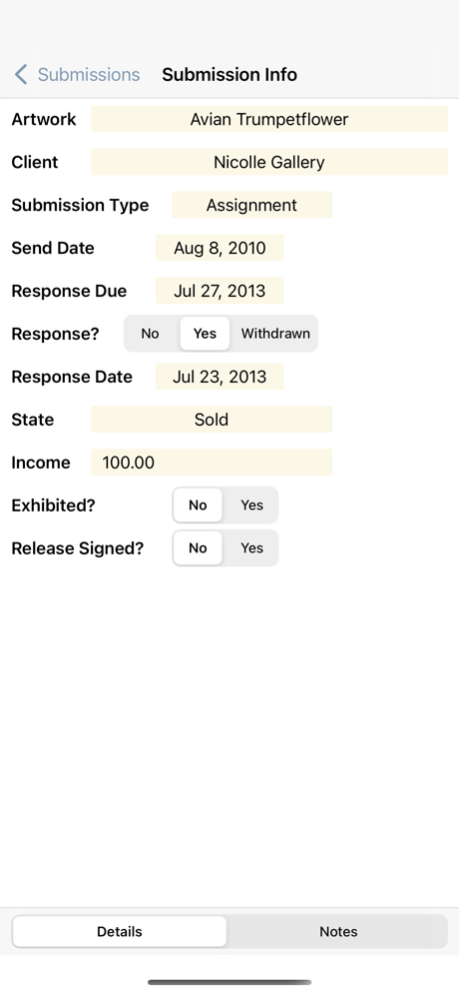
Artwork Tracker is an indispensable mobile app for artists, art collectors, or art dealers. Keep track of artwork and submissions on the go, with access to all your data and full-screen artwork at your fingertips.
** Note: This is the free Lite version of Artwork Tracker. The Lite version is almost identical to the full version, but only allows you to store up to 5 artworks, 5 clients, and 5 submissions. It also includes database backup and export over WiFi (but not restore/import), allowing easy upgrade to the full version. The full version has no such limitations. **
Artwork Tracker makes keeping track of your art collection easy. Never wonder again where or when you submitted your art. The information is all right there on your iPhone, iPad, or iPod touch!
Whether you're a working artist, a collector, or an art dealer, Artwork Tracker is a valuable addition to your artistic toolbox.
Here's what you can do with Artwork Tracker:
* Track submissions for all your artwork.
* View your artwork collection in table form or by image.
* Store client details and quickly reference client websites.
* Check the status of your artwork, clients and submissions at a glance.
* Record details about your artwork, including creation notes.
* View total income earned for each artwork.
* View the submission history for each artwork or client, sorted by date.
* Record details and view response times for each submission.
* Check on past due submissions flagged with an exclamation mark, orange highlight, and red number badge.
* Review statistics for your collection.
* Protect your data with a passcode lock.
* Database backup and export over WiFi to your computer's web browser.
* CSV format support to export your Artwork Tracker database to desktop spreadsheet applications.
* Artwork Report export feature. View your art collection on your computer's web browser! Great for keeping track of your art for inventory or insurance purposes.
* iPad support at no extra charge!
Please visit http://artworktracker.com for more information about Artwork Tracker, including contact details to ask questions, request features, or report any issues. Join the Facebook page to discuss Artwork Tracker with other fans.
Version History Note: This update requires iOS 15 or higher!
- Improved iOS 26 support.
- Added support for new devices.
- Renamed AirDrop button on the Backup Database popup to Share.
- WiFi is no longer required to share the database on the Backup Database popup.
- Bug fixes. 3.3 Sep 15 Note: This update requires iOS 9 or higher!
- Improved iOS 15 support.
- Added support for new devices.
- Added support for Dark Mode.
- Bug fixes. 3.2 12/09/2021 - Added support for the PC version of Artwork Tracker.
- Added Fair and Show Client Types. 3.1 08/14/2017 - Bug fixes. 3.0 06/02/2017 - Fixes a bug with missing photo albums imported via iTunes. 2.9 03/06/2017 - Bug fixes. 2.8 02/27/2017 Note: This update requires iOS 8 or higher!
- Added iOS 10 support.
- Add multiple photos at a time from your photo library.
- Increased photo thumbnail size on the Artwork and Submissions lists.
- Increased photo resolution when adding new photos.
- Added Extra-Large photos option for the Artwork Report feature.
- Added Exhibiting, Donated, and Gifted Submission states.
- Increased photo caption font size.
- Added photo sharing feature.
- Removed built-in web browser.
- Bug fixes. 2.7 12/20/2016 Note: This update requires iOS 6 or higher!
- Added iOS 9 support.
- Added iPad Pro support.
- Bug fixes. 2.6 04/25/2016 Note: This update requires iOS 5.1.1 or higher!
- Added iOS 8 and 64-bit support.
- Support for new high-resolution iPhone 6 / 6 Plus displays.
- Added database backup via AirDrop (requires iOS 7 or higher and AirDrop-capable devices).
- All info screens now use scrollable lists.
- Device rotation is now supported on info screens for iPhone and iPod touch.
- User interface improvements.
- Bug fixes. 2.5 02/02/2015 - Camera view now appears in full-screen instead of a popup on iPad.
- Fixed add button tap issues on iOS 7. 2.4 12/11/2013 Note: This update requires iOS 5.0 or higher!
- Added iOS 7 support.
- New iOS 7-style minimalist interface.
- Artist names are now shown in section headings when sorting Artworks by Artist.
- Bug fixes. 2.3 10/02/2013 - Bug fixes. 2.2 09/08/2013 - Updated database transfer alerts to mention the ability to connect with the Mac version of Artwork Tracker.
- Bug fixes.
If you're enjoying Artwork Tracker, please spare a moment to rate or review it on the App Store. Thanks! 2.1 08/14/2013 - Upgraded the database to remove the 2 photo per Artwork limitation.
- Increased the number of photos per Artwork to 5.
- The Artwork Report now allows more than 2 photos per Artwork.
- Added a photo grid screen accessible from the Photos button on the Artwork Info screen. This shows all photos associated with a particular Artwork.
- Photos can now be rearranged. In the photo grid view for any Artwork, long press (not tap) the photo and drag it to the new position.
- The Artwork Info screen now has 5 main photo slots on iPad. To view the complete set of photos for any Artwork, tap the Photos button on the Artwork Info screen.
- The main photo slots reflect the order on the Artwork Info Photos screen.
- Added support for text captions for each photo. These can be edited by tapping the speech balloon icon when viewing photos full-screen.
- Added a search bar on the Artwork, Clients, and Submissions lists.
- Updated the CSV template to remove the photo index fields for Artworks (these fields are now unsupported).
- Improved Bluetooth keyboard support.
- Bug fixes.
- The database can now be transferred directly from Artwork Tracker Lite to the full version. Use the "Export to Full App" button on the Tools screen.
If you're enjoying Artwork Tracker, please take a moment to rate or review it on the App Store. Thanks! 2.0 06/12/2013 - Fixed truncation bug affecting decimal number fields.
- Fixed photo grid layout bugs.
- Localized decimal numbers on info and statistics screens, in CSV output, and in artwork reports. 1.9 11/16/2012 Note: This update requires iOS 4.3 or higher!
- Added iOS 6 support.
- Support for new high-resolution iPhone 5 and iPod touch displays.
- Improved data saving behavior.
- Prevent automatic screen-locking during database transfer over WiFi.
- Bug fixes. 1.8 10/29/2012 - Updated icon and other graphics for the new iPad Retina display.
- Increased resolution of photo thumbnails (does not affect existing thumbnails).
- Added page breaks to Artwork Report to prevent page overruns when printing.
- Added photo zooming and panning.
- Added swiping between photos in the full-screen view.
- Improved scrolling performance with photo grid.
- User interface improvements.
- Added iPad camera support.
- Bug fixes. 1.7 04/18/2012 Note: This update requires iOS4.0 or higher!
- Added Artwork Report export feature. View your art collection on your computer's web browser! Great for keeping track of your art for inventory or insurance purposes.
- Bug fixes. 1.6 02/12/2012 - Fixed EXIF orientation handling when saving photos.
- Fixed progress pop-up view orientation bug. 1.5 10/25/2011 - Bug fixes for iOS 5.0.
- Fixed bug where Artwork For Sale/Loan setting would change when the Artwork Info screen first appears.
- User interface improvements. 1.4 10/18/2011 - Fixed potential image degradation when backing up and restoring the database into the full version of Artwork Tracker.
- Fixed crash when deleting multiple artworks or clients. 1.3 08/03/2011 - Added thumbnail artwork images for client submission history and main submission list.
- Added Approaching Deadline highlighting for clients.
- Added settings screen options to configure deadline highlight interval and option to clear highlights for past deadlines.
- Bug fixes. 1.2 06/10/2011 - New field for clients (client type)
- Two new fields for submissions (exhibited and submission type)
- New reserved state for submission status
- Larger artwork thumbnails for iPhone/iPod
- Artist name displayed for each artwork
- Added settings option to sort artwork by artist name
- Artwork status icons
- Larger notes fields on iPad
- Larger field size for new medium entry
- Artist name picker
- Bug fixes 1.1 01/25/2011 1.0 12/17/2010
About Artwork Tracker Lite
The company that develops Artwork Tracker Lite is Andrew Nicolle. The latest version released by its developer is 3.3.
To install Artwork Tracker Lite on your iOS device, just click the green Continue To App button above to start the installation process. The app is listed on our website since 2026-10-17 and was downloaded 0 times. We have already checked if the download link is safe, however for your own protection we recommend that you scan the downloaded app with your antivirus. Your antivirus may detect the Artwork Tracker Lite as malware if the download link is broken.
How to install Artwork Tracker Lite on your iOS device:
- Click on the Continue To App button on our website. This will redirect you to the App Store.
- Once the Artwork Tracker Lite is shown in the iTunes listing of your iOS device, you can start its download and installation. Tap on the GET button to the right of the app to start downloading it.
- If you are not logged-in the iOS appstore app, you'll be prompted for your your Apple ID and/or password.
- After Artwork Tracker Lite is downloaded, you'll see an INSTALL button to the right. Tap on it to start the actual installation of the iOS app.
- Once installation is finished you can tap on the OPEN button to start it. Its icon will also be added to your device home screen.
Program Details
System requirements
Download information
Pricing
Version History
version 3.3
posted on 2026-10-17
Version History Note: This update requires iOS 15 or higher!
- Improved iOS 26 support.
- Added support for new devices.
- Renamed AirDrop button on the Backup Database popup to Share.
- WiFi is no longer required to share the database on the Backup Database popup.
- Bug fixes. 3.3 Sep 15 Note: This update requires iOS 9 or higher!
- Improved iOS 15 support.
- Added support for new devices.
- Added support for Dark Mode.
- Bug fixes. 3.2 12/09/2021 - Added support for the PC version of Artwork Tracker.
- Added Fair and Show Client Types. 3.1 08/14/2017 - Bug fixes. 3.0 06/02/2017 - Fixes a bug with missing photo albums imported via iTunes. 2.9 03/06/2017 - Bug fixes. 2.8 02/27/2017 Note: This update requires iOS 8 or higher!
- Added iOS 10 support.
- Add multiple photos at a time from your photo library.
- Increased photo thumbnail size on the Artwork and Submissions lists.
- Increased photo resolution when adding new photos.
- Added Extra-Large photos option for the Artwork Report feature.
- Added Exhibiting, Donated, and Gifted Submission states.
- Increased photo caption font size.
- Added photo sharing feature.
- Removed built-in web browser.
- Bug fixes. 2.7 12/20/2016 Note: This update requires iOS 6 or higher!
- Added iOS 9 support.
- Added iPad Pro support.
- Bug fixes. 2.6 04/25/2016 Note: This update requires iOS 5.1.1 or higher!
- Added iOS 8 and 64-bit support.
- Support for new high-resolution iPhone 6 / 6 Plus displays.
- Added database backup via AirDrop (requires iOS 7 or higher and AirDrop-capable devices).
- All info screens now use scrollable lists.
- Device rotation is now supported on info screens for iPhone and iPod touch.
- User interface improvements.
- Bug fixes. 2.5 02/02/2015 - Camera view now appears in full-screen instead of a popup on iPad.
- Fixed add button tap issues on iOS 7. 2.4 12/11/2013 Note: This update requires iOS 5.0 or higher!
- Added iOS 7 support.
- New iOS 7-style minimalist interface.
- Artist names are now shown in section headings when sorting Artworks by Artist.
- Bug fixes. 2.3 10/02/2013 - Bug fixes. 2.2 09/08/2013 - Updated database transfer alerts to mention the ability to connect with the Mac version of Artwork Tracker.
- Bug fixes.
If you're enjoying Artwork Tracker, please spare a moment to rate or review it on the App Store. Thanks! 2.1 08/14/2013 - Upgraded the database to remove the 2 photo per Artwork limitation.
- Increased the number of photos per Artwork to 5.
- The Artwork Report now allows more than 2 photos per Artwork.
- Added a photo grid screen accessible from the Photos button on the Artwork Info screen. This shows all photos associated with a particular Artwork.
- Photos can now be rearranged. In the photo grid view for any Artwork, long press (not tap) the photo and drag it to the new position.
- The Artwork Info screen now has 5 main photo slots on iPad. To view the complete set of photos for any Artwork, tap the Photos button on the Artwork Info screen.
- The main photo slots reflect the order on the Artwork Info Photos screen.
- Added support for text captions for each photo. These can be edited by tapping the speech balloon icon when viewing photos full-screen.
- Added a search bar on the Artwork, Clients, and Submissions lists.
- Updated the CSV template to remove the photo index fields for Artworks (these fields are now unsupported).
- Improved Bluetooth keyboard support.
- Bug fixes.
- The database can now be transferred directly from Artwork Tracker Lite to the full version. Use the "Export to Full App" button on the Tools screen.
If you're enjoying Artwork Tracker, please take a moment to rate or review it on the App Store. Thanks! 2.0 06/12/2013 - Fixed truncation bug affecting decimal number fields.
- Fixed photo grid layout bugs.
- Localized decimal numbers on info and statistics screens, in CSV output, and in artwork reports. 1.9 11/16/2012 Note: This update requires iOS 4.3 or higher!
- Added iOS 6 support.
- Support for new high-resolution iPhone 5 and iPod touch displays.
- Improved data saving behavior.
- Prevent automatic screen-locking during database transfer over WiFi.
- Bug fixes. 1.8 10/29/2012 - Updated icon and other graphics for the new iPad Retina display.
- Increased resolution of photo thumbnails (does not affect existing thumbnails).
- Added page breaks to Artwork Report to prevent page overruns when printing.
- Added photo zooming and panning.
- Added swiping between photos in the full-screen view.
- Improved scrolling performance with photo grid.
- User interface improvements.
- Added iPad camera support.
- Bug fixes. 1.7 04/18/2012 Note: This update requires iOS4.0 or higher!
- Added Artwork Report export feature. View your art collection on your computer's web browser! Great for keeping track of your art for inventory or insurance purposes.
- Bug fixes. 1.6 02/12/2012 - Fixed EXIF orientation handling when saving photos.
- Fixed progress pop-up view orientation bug. 1.5 10/25/2011 - Bug fixes for iOS 5.0.
- Fixed bug where Artwork For Sale/Loan setting would change when the Artwork Info screen first appears.
- User interface improvements. 1.4 10/18/2011 - Fixed potential image degradation when backing up and restoring the database into the full version of Artwork Tracker.
- Fixed crash when deleting multiple artworks or clients. 1.3 08/03/2011 - Added thumbnail artwork images for client submission history and main submission list.
- Added Approaching Deadline highlighting for clients.
- Added settings screen options to configure deadline highlight interval and option to clear highlights for past deadlines.
- Bug fixes. 1.2 06/10/2011 - New field for clients (client type)
- Two new fields for submissions (exhibited and submission type)
- New reserved state for submission status
- Larger artwork thumbnails for iPhone/iPod
- Artist name displayed for each artwork
- Added settings option to sort artwork by artist name
- Artwork status icons
- Larger notes fields on iPad
- Larger field size for new medium entry
- Artist name picker
- Bug fixes 1.1 01/25/2011 1.0 12/17/2010
version 3.2
posted on 2021-12-09
Dec 9, 2021
Version 3.2
Note: This update requires iOS 9 or higher!
- Improved iOS 15 support.
- Added support for new devices.
- Added support for Dark Mode.
- Bug fixes.
Disclaimer
Official App Store Link
We do not host Artwork Tracker Lite on our servers. We did not scan it for viruses, adware, spyware or other type of malware. This app is hosted by Apple and passed their terms and conditions to be listed there. We recommend caution when installing it.
The App Store link for Artwork Tracker Lite is provided to you by apps112.com without any warranties, representations or guarantees of any kind, so access it at your own risk.
If you have questions regarding this particular app contact the publisher directly. For questions about the functionalities of apps112.com contact us.
